
How to Use AI to Write Marketing Emails Without Sounding Like a Robot
The framework we use to draft client emails with AI that read as human. Voice capture, prompt structure, and the edits that matter.
If you have ever sent an AI-written email and watched a customer reply with "did you mean to send me this," you already know the problem. The first draft sounds like a corporate apology bot. The opening line is "I hope this email finds you well." The CTA is "let me know if you have any questions." Nothing in the email sounds like you. Customers can tell within four seconds.
A fashion retail client we work with hit this wall in her first month with ChatGPT. She runs a boutique and her brand voice is warm, a little playful, with a specific way of describing fit and feel. The AI drafts she was getting were the opposite of that. She was about to abandon the whole experiment. We rebuilt her workflow in an afternoon and her email open rates climbed within the next two campaigns. This is the workflow.
Why AI Emails Sound Like Robots By Default
AI tools are trained on the entire internet. The internet is full of bad marketing emails written by bad copywriters who have never met your customer. When you ask the AI to write you an email with no instructions, it averages all the bad emails it has seen and gives you the median. The median is bland. The median is "leverage." The median is "in today's fast-paced world."
The fix is not to abandon AI. The fix is to stop letting it average. Give it the specifics of your voice, your customer, and your offer, and it will write something close enough to you that the editing takes 90 seconds instead of 20 minutes.
The 3-Layer Voice Capture That Actually Works
You only need to do this once per business. After the first hour, every future email is faster.
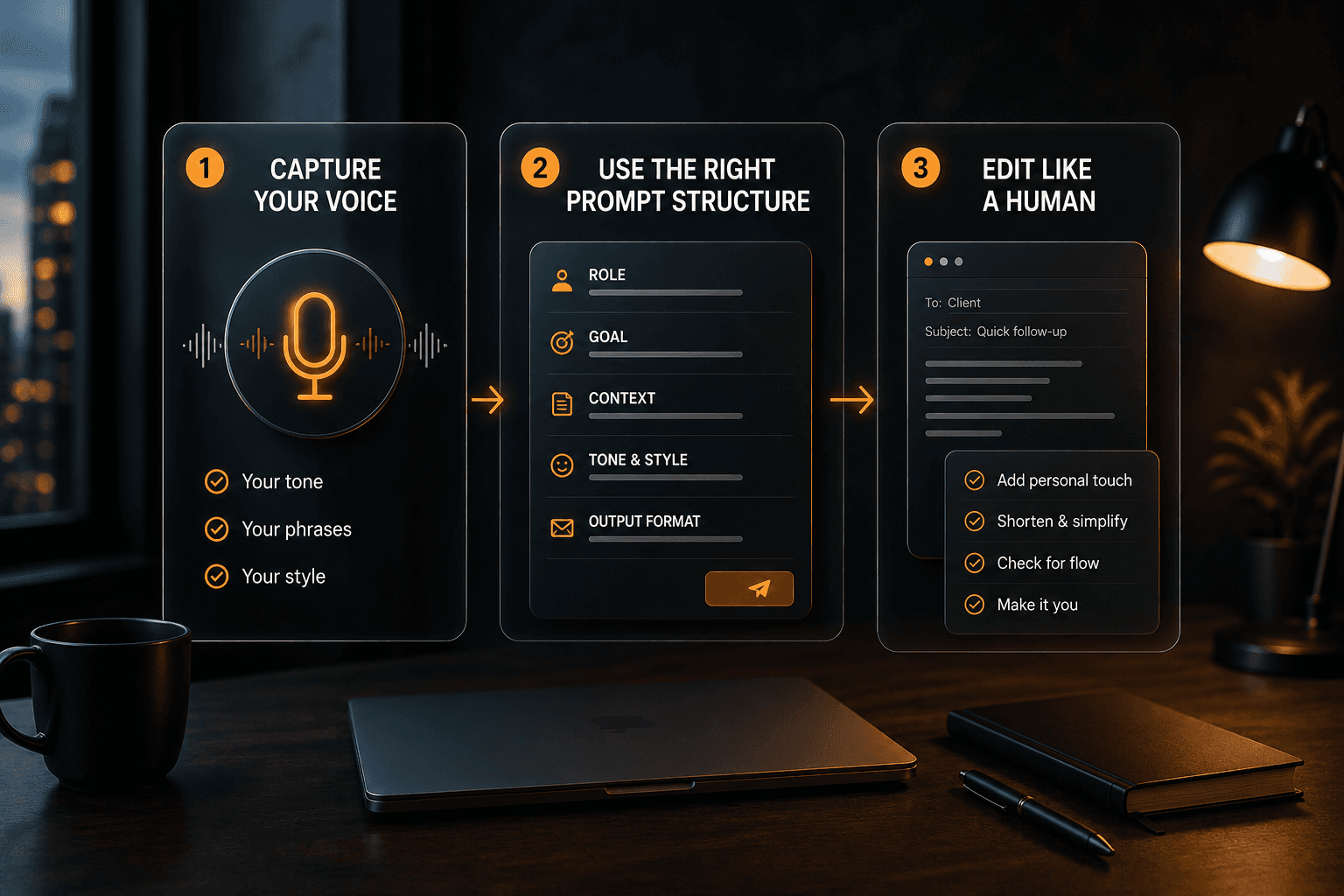
Layer 1: The brand voice doc. A one-page document that lists three things. The pillars (e.g., "warm, direct, a little dry"). The phrases you would never use (e.g., "leverage, seamless, unlock, game-changer"). The phrases you do use (e.g., "the actual reason," "here is the truth," "what most owners get wrong"). Save it. Reference it in every prompt.
Layer 2: Three sample emails you wrote yourself. Pick the three best emails you have ever sent to a customer. Paste them as examples in your prompt with the instruction "match this voice." The AI will mimic patterns it sees in real examples far more accurately than it will follow abstract instructions like "be friendly."
Layer 3: A constraint list specific to email. Three rules. No exclamation points. No "Hope this email finds you well." No "I wanted to reach out." Add or remove rules as you find tics you keep editing out.
That is the entire setup. One brand voice doc, three sample emails, three constraints. Fits on one page. Reused forever.
The Email Prompt That Replaces 20 Minutes With 3
Here is the structure. Copy it. Edit it once with your business specifics. Save it.
"You are [your name] writing a [type of email] to [audience]. Your brand voice is [3 words from your voice doc]. Match the voice of these three sample emails: [paste 3 emails].
Task: write [how many] versions of an email about [topic]. The email should: [3 specific things it must include]. The email should NOT: [3 things it must avoid]. Do not use the word [banned phrase]. Do not start with [banned opener]. End with [specific CTA].
Format: subject line, preview text, body. Subject line under 50 characters. Body under 200 words. Tone is [tone description]."
That is it. Drop in the specifics for your business and you have a reusable prompt that produces drafts close to publishable on the first try.
A Real Example: Three Versions of a Restock Email
The boutique client needed an email to announce a restock of a popular dress style. Old workflow: she would stare at a blank screen for 30 minutes and either send a one-line "It's back!" email or skip the campaign entirely. Result: low engagement, missed sales.
New workflow with the prompt above: she pasted in three of her past best-performing emails, the brand voice doc, and the prompt. ChatGPT generated three versions in under a minute. She picked one, swapped two phrases for her own (the AI used "unbox" and she would say "open"), added a specific styling tip from her own head, and sent it.
The campaign open rate landed in line with her best historical sends. The total time from "I should send something" to "send" was under 10 minutes. Multiply that across a year of campaigns and you have an entirely different marketing engine.
The Edits That Matter
Even with a perfect prompt, the first draft will need touch-ups. These are the four edits that matter most.
Edit 1: The opening line. AI loves "I hope this email finds you well" and its variants. Always rewrite the opening line to a specific reference (a recent customer interaction, an event, a season, anything concrete). The opening line is the difference between a deleted email and a read one.
Edit 2: One specific detail only you would know. Add one sentence that an outsider could not have written. A customer's first name. A specific product. A reference to last week's launch. This is the human signal that breaks the "this is a mass email" pattern in the reader's brain.
Edit 3: The CTA verb. AI defaults to "Click here," "Learn more," and "Get started." Replace the verb with something specific to the action. "Grab one before they sell out." "Book a 15-minute call." "Reply with your size and I will hold one." Specific verbs convert better.
Edit 4: One sentence cut. AI loves to repeat itself. Find the one sentence in the draft that says nothing new and delete it. The email gets stronger every time.
These four edits take under two minutes per email. They are the difference between AI-assisted and AI-generated.
What Customers Actually Notice
In our internal testing across client campaigns, the patterns customers flag as "obvious AI" are remarkably consistent. The dead giveaways are: the phrase "I hope this email finds you well," excessive em dashes, every paragraph starting with the same word, "leverage" or "seamless" anywhere in the body, and a closing line that says "let me know if you have any questions" in those exact words.
If you remove those five tics, customers stop noticing the AI. The email becomes "an email," which is exactly what you want.
The Compounding Habit
The first email you write with this workflow will take 15 minutes including the setup. The fifth will take 6 minutes. The fiftieth will take 3 minutes. The setup compounds. The voice doc gets sharper as you spot patterns. The sample emails get swapped for newer ones. The prompt template gets refined. By month three, you are writing better emails faster than you ever did before AI.
That is the bar. Not "AI replaces my marketing." It is "AI makes my marketing the kind of consistent that solo owners almost never achieve."
Want us to set up an email workflow you can run yourself?
That is one of the deliverables in our 90-day pilot. Setup plus monthly support.
Can AI write emails that sound like me?
Yes, if you give it three things: a brand voice doc, three real sample emails, and a list of phrases to avoid. Without those inputs, AI defaults to a generic friendly-corporate voice that sounds like everyone else.
Will customers know if I use AI for emails?
Only if you skip the editing step. Customers spot raw AI output by specific tics (the "hope this email finds you well" opener, repeated phrasing, generic CTAs). Two minutes of human edits removes the giveaways.
What is the best AI tool for email marketing?
For draft quality, Claude is the strongest. For speed and integration, ChatGPT. For Gmail-native convenience, Gemini in Workspace. Most owners do best starting with the free version of Claude or ChatGPT.
How do I keep my brand voice with AI?
Build a one-page voice doc once: pillars, banned phrases, signature phrases. Paste it into every prompt. Add three sample emails. The AI will mimic patterns from real examples far more accurately than abstract instructions.
Should I use AI for subject lines?
Yes, for variants. Have AI generate 10 subject line options. Pick the two that feel most human, A/B test them, learn what your audience opens. Subject line testing is one of the highest-leverage uses of AI in email.




Quick Links


" height="149.2535067768008px" id="IOCTf08f5" width="1199.9520008715217px"/></svg>)