
What Is AI, Actually? A Plain-English Answer for Small Business Owners
AI explained without the hype. What it is, what it isn't, and the three things a small business owner can actually do with it this month.
A few months ago we sat in the warehouse office of an electrical supply company in the GTA. The owner pulled out a printout of 200 product descriptions a manufacturer had sent over, all written in identical robotic phrasing. He asked us a question we hear every week. "Everyone keeps saying I should use AI. Use it for what?"
That is the right question. And almost no one is answering it honestly.
Most explanations of AI either drown small business owners in jargon or pitch them a $5,000 chatbot they do not need. This article does neither. It tells you what AI actually is, what it actually does, and the three things you can do with it before the end of the month. No hype. No filler.
The One-Sentence Definition That Holds Up
AI is software that learns patterns from huge amounts of text, images, or data and uses those patterns to do tasks that used to require a human brain.
That is it. Strip away the marketing language and you are left with pattern recognition at scale. When ChatGPT writes an email for you, it is predicting which words usually follow each other in good emails. When a tool like Otter transcribes your call, it is matching audio patterns to text patterns. When a recommendation engine suggests what to watch next, it is matching your viewing patterns to other people's.
The reason this matters for your business is that almost every task in a small business has a pattern. Replying to a quote request. Writing a follow-up email. Drafting a social post. Answering the same question for the hundredth time. AI is not magic. It is a very fast junior employee who has read more emails, more sales pages, and more customer questions than any human could in a lifetime.
You do not need to understand how it works under the hood. You only need to understand what kind of tasks it is good at, what it is bad at, and where the line sits.
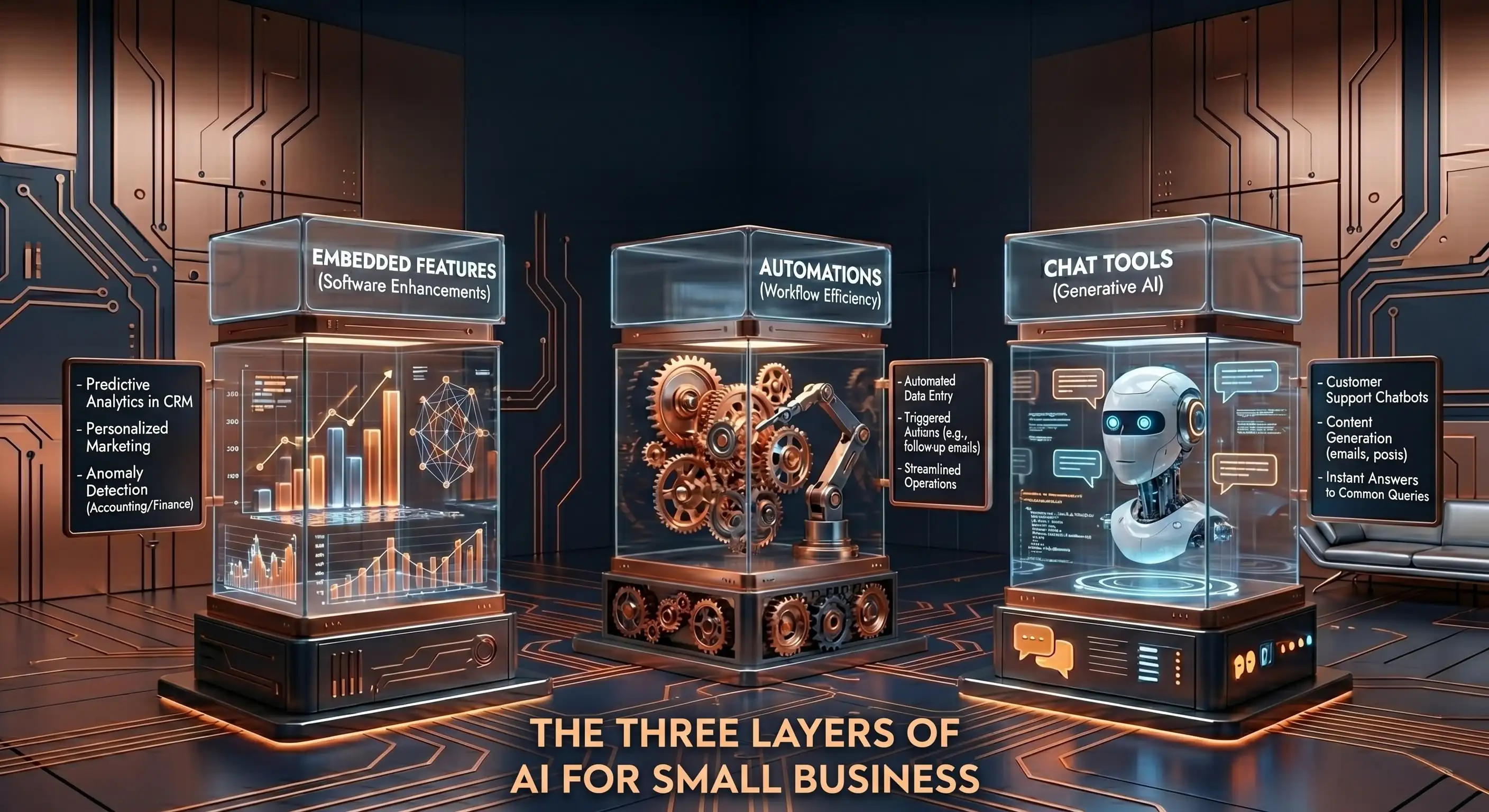
The Three Layers of AI Most Owners Confuse
When people say "AI" they usually mean one of three different things. Confusing them is why most owners feel lost.
Layer 1: Chat tools. ChatGPT, Claude, Gemini, Copilot. You type a request, you get a written response. This is the layer most small business owners should start with because it is free, requires zero setup, and pays back the first time you use it.
Layer 2: Automations. Tools like Zapier, Make, and n8n that connect your apps and let AI act on your behalf inside them. Example: when a new lead fills your form, draft a personalized response, log it to your CRM, and schedule a follow-up. This layer takes a weekend to set up and can save five to ten hours a week on repeat tasks.
Layer 3: Embedded AI inside apps you already use. Gmail's smart reply, Canva's Magic Write, QuickBooks' auto-categorization, Photoshop's generative fill. You are probably already using these without calling them AI. If you have ever clicked an autocomplete suggestion in an email, you have used AI.
Most owners hear "AI" and jump straight to Layer 2 or Layer 3 because it sounds advanced. Start at Layer 1. Master the chat tools. The other two layers make sense only after you can already get good answers out of a chat tool.
What AI Is Actually Good At Right Now
We have tested every major AI tool against real client work over the past two years. Here is the honest list of what AI is good at today.
It is good at first drafts. Emails, blog posts, social captions, proposals, ad copy. Not finished work. Drafts. The human still has to edit.
It is good at summarizing long things. Meeting transcripts, contracts, policy docs, customer reviews. Paste it in, get the gist out.
It is good at translating between formats. Turn a voice memo into a project plan. Turn a long article into a LinkedIn post. Turn a list of features into a benefits-led sales page.
It is good at answering specific structured questions. "Rewrite this in a friendlier tone." "Find the three weakest sentences in this paragraph." "Generate five subject line variants under 50 characters."
It is bad at original thinking, accurate math, anything requiring real-time information, and anything requiring it to remember a previous conversation perfectly. Those limits matter. If you treat AI like a calculator, you will get burned. If you treat it like a junior employee who needs to be checked, you will get value.
A Real Example: The 200 Product Descriptions
Back to the electrical supply company. The 200 product descriptions were copy-pasted from manufacturer datasheets and sounded identical. They were costing the business organic search traffic because Google ignores duplicate content.
We did not buy them a chatbot. We did not build them an AI agent. We sat with the owner for an hour, opened ChatGPT, and built a single prompt that took a manufacturer datasheet and rewrote the description in their voice with the contractor buyer in mind. The owner ran every product through it himself. We edited the first 20 with him to teach the pattern. After that he did the rest.
A few months later the rewritten product pages were pulling in organic traffic the old ones never did. No agency retainer. No software stack. One prompt and a Friday afternoon.
That is what AI looks like when it actually works for a small business. A specific task, a clear input, a predictable output, and a human in the loop.
What to Do This Week
If you have read this far you do not need more theory. You need one action.
Open ChatGPT or Claude. Pick the single repetitive writing task that drains you most this week. Quote replies. Follow-up emails. Service descriptions. Whatever it is, paste in one real example, ask for three rewrites in your voice, and edit the best one. Total time, 20 minutes. You will learn more about AI from doing this once than from reading another five articles about it.
That is the entire on-ramp. Everything else, the automations, the chatbots, the agents, comes after.
Our $197 AI Audit gives you a written, no-hype answer in two hours.
Is AI the same as ChatGPT?
No. ChatGPT is one product made by one company (OpenAI) in one category of AI (chat tools). AI is the broader field. Other chat tools include Claude, Gemini, and Copilot. AI also includes image generators, voice transcription, and embedded features inside apps you already use.
Do I need to be technical to use AI?
No. The chat tool layer (Layer 1) is plain English in, plain English out. If you can write a clear email to a new employee, you can write a clear prompt to AI. The automation layer (Layer 2) takes a bit more setup but most small business owners can handle it with a tutorial.
How much does AI cost for a small business?
The chat tools have free versions that handle most small business needs. Paid versions run $20 to $30 per user per month and unlock better models, longer context, and image generation. You should not be spending more than $100 per month on AI tools in your first six months.
Will AI replace my employees?
Not the good ones. AI will replace specific repetitive tasks inside jobs, not entire jobs. Your best employees will use AI to do more of the work they are actually paid for. The risk is not that AI replaces your team. The risk is that a competitor's team starts using AI and ships twice as fast as yours.
What is the simplest way to start with AI?
Pick one writing task you do every week. Open a free chat tool. Paste in a real example. Ask for three rewrites. Edit the best one. Repeat next week with a new task. Do that for a month and you will know more about AI than 90% of small business owners.





Quick Links


" height="149.2535067768008px" id="IOCTf08f5" width="1199.9520008715217px"/></svg>)